Short answer: a dental chair that will not move is more often prevented from moving than broken. The wall supply, the master switch, a safety stop, the foot control or a lock mode account for many of the calls we attend. Check those five things in order, from the outside of the chair. If the chair hums, smells hot, trips the supply or moves in one direction only, stop, switch it off at the isolator and call an engineer.
First: is it safe to keep checking?
Stop, and switch the chair off at its wall switch or local isolator if you can reach it safely, if any of the following apply:
- a smell of burning or hot plastic, smoke or visible sparking;
- a loud hum or buzz from the base that continues while nothing moves;
- water on or around the base, particularly near cables or the control box;
- a circuit breaker that tripped again after being switched back on once.
In those cases do not go on with the checks below and do not put the chair back into use until an engineer has examined it. Do not continue using equipment you believe may be unsafe. Everything else in this article assumes the chair is quiet, dry and simply not responding. Every check below is done from the outside of the chair: covers, panels and guards stay in place, because the base and the delivery unit contain mains-voltage parts and, on hydraulic chairs, fluid under pressure.
The checks, in order
1. Is the chair receiving power?
Confirm the wall switch or fused spur is on and the indicator light on the unit is lit. On many treatment centres the chair, the delivery unit and the light share one supply, so if the light and the handpiece controls are also dead, the fault is upstream of the chair itself. Look at the consumer unit for a tripped breaker on the surgery circuit. A tripped breaker may be switched back on once. If it trips again, leave it off and report it: a repeat trip is a fault, not a nuisance.
2. Is the master switch on, and has the unit finished starting up?
Most units have a master switch separate from the wall supply, often under the delivery unit or on the base. Some run a short self-test on power-up and ignore commands until it finishes. Switch the master off, wait a few seconds, switch it back on and try the movement again.
3. Has a safety stop been triggered?
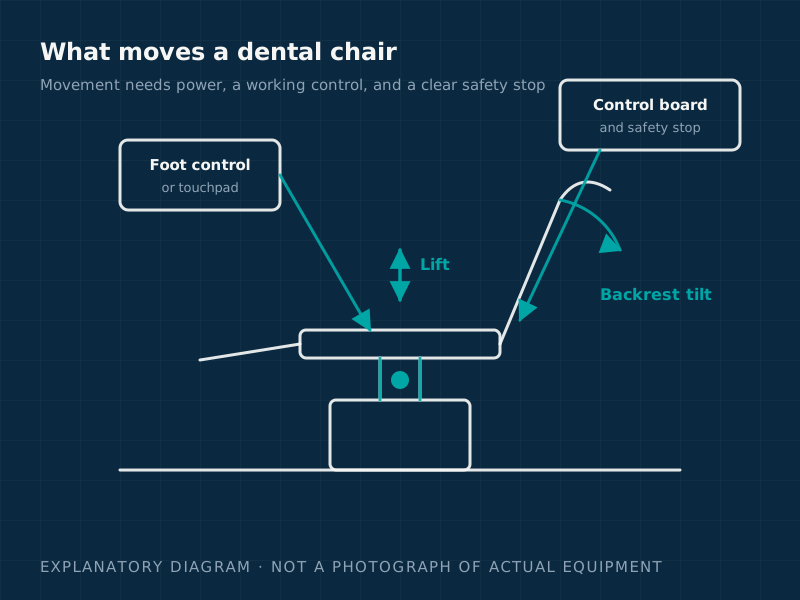
Chairs have anti-trap and anti-collision protection so that a foot, a stool or a mobile cart cannot be crushed. Common triggers are:
- the base plate or foot-guard switch — something resting against the skirt of the base, or a floor mat pushed under it;
- the backrest safety switch — a cabinet, cart or assistant's stool in the recline path;
- the cuspidor or arm position — some units block chair movement while a swing-out cuspidor or instrument arm is in a particular position;
- an emergency stop pressed accidentally and left latched, which is released only in the way the manufacturer's instructions describe.
Clear the area around the base and backrest, return arms and cuspidor to their home positions, and try again. A safety stop that clears when you move an obstruction is not a fault. A stop that triggers with nothing in the way is a fault: report it, and do not tape, wedge or hold the switch to finish a session.
4. Is it the foot control?
If the chair responds to the touchpad or the buttons on the unit but not to the foot control, or the other way round, the problem is in that control path rather than the chair drive. Check that the foot control is not trapped under a castor or a cabinet, that its cable is not crushed or stretched, and that a wireless foot control has charge and is paired. A foot control that has been rolled over or dropped can leave a switch stuck in one position, which blocks all movement on some designs. If the cable's plug is somewhere you can see and reach without disturbing anything, check it is seated; if it is inside the base, leave it to the engineer.
5. Is it a locked program or a mode setting?
Many chairs have a lock or "cleaning" mode that disables movement so the chair cannot be knocked while being wiped down. Others disable manual movement while a programmed position is being executed or after a fault code is displayed. Look for a padlock symbol, a service code or a flashing indicator, and consult the unit's quick guide for the clearing sequence. Write down any code shown before you clear it.
What the symptom tells you
| Symptom | Most likely area | Practice can check? |
|---|---|---|
| Nothing on the unit is lit; light and handpieces also dead | Supply: wall switch, spur, breaker | Yes |
| Unit lit but no response to any control | Master switch, self-test, safety stop, lock mode | Yes |
| Moves from touchpad but not foot control (or vice versa) | That control, its cable or its receiver | Partly |
| Moves in one direction only | Limit switch, safety switch or one drive circuit | No: report |
| Hums but does not move | Drive motor, hydraulic pump or a mechanical jam | No: switch off at the isolator and report |
| Moves then stops part-way, possibly with a code | Overload, position sensor or control fault | Note the code and report |
| Sinks slowly under load | Hydraulic valve or seal (hydraulic chairs) | No: take the chair out of use and report |
Hydraulic and electromechanical chairs behave differently
Older and some current chairs raise and lower with a hydraulic pump and cylinder; most modern chairs use electric actuators. A hydraulic chair that hums but does not lift, or that creeps down while a patient is seated, usually has a valve, seal or oil-level problem. An electromechanical chair that stops dead with no noise is more likely to have a control, sensor or switch fault. Neither is a practice job: hydraulic systems hold fluid under pressure and the drives carry mains voltage, so the covers stay on and the engineer does the rest.
What not to do
- Do not take base or backrest covers off to "have a look". The moving parts and wiring inside are not designed to be exposed while the chair is switched on.
- Do not force a movement by pushing or pulling on the backrest or seat.
- Do not bypass a safety switch with tape or a wedge to finish a session. The switch exists to prevent a crush injury.
- Do not switch a breaker back on more than once.
- Do not treat a patient in a chair that creeps, jerks or stops part-way.
What to tell the engineer
A clear description shortens the visit. Have ready:
- the make and model of the chair, and its serial number if the label is accessible;
- exactly which movements fail (up, down, backrest, headrest, programmed positions) and which still work;
- whether the touchpad, foot control or both are affected;
- any code, symbol or flashing indicator displayed;
- whether the fault appeared suddenly or has been intermittent;
- anything that changed recently: a deep clean, a knock, a new mat, building work, a power cut.
When to stop and call an engineer
Stop checking and call if the chair still does not move after the five checks, if it hums, trips the supply, moves in only one direction, creeps under load, or shows a fault code that will not clear. Use report a breakdown to describe the symptoms, or see dental equipment repairs for how a repair visit works. Chairs whose movement faults keep returning are usually telling you something about their condition; dental chair servicing picks up worn switches, cables and seals before they stop a session. Isolate any chair that smokes, sparks, overheats or leaks near its electrics, and do not continue using equipment you believe may be unsafe.
This article is general guidance for dental practices. It does not replace the manufacturer's instructions for your specific equipment, is not a statement of your regulatory position, and is not a substitute for an engineer examining the machine. If equipment smokes, sparks, overheats or leaks near electrical parts, isolate it and do not use it until it has been checked.
Sources
- Manufacturer operating and maintenance instructions for the installed chair or treatment centre — Equipment manufacturer (accessed 9 September 2026)
- Provision and Use of Work Equipment Regulations 1998: Approved Code of Practice and guidance (L22) — Health and Safety Executive (accessed 9 September 2026)
- Managing medical devices: guidance for health and social care organisations — Medicines and Healthcare products Regulatory Agency (accessed 9 September 2026)
- Electricity at Work Regulations 1989: guidance on regulations (HSR25) — Health and Safety Executive (accessed 9 September 2026)